scotsphere AI
Menu
Book a demo

CONNECTED HOME CONTROL

A more responsive home, with control kept simple

SmartProperties can connect residents with supported equipment in their home, helping everyday controls become easier to use while giving authorised services a clearer view of the technology they manage.

The capability is organised around the property and the resident—not around a collection of unrelated devices. The controls available in each deployment are determined by the supported equipment, agreed integrations and permissions configured for the service.

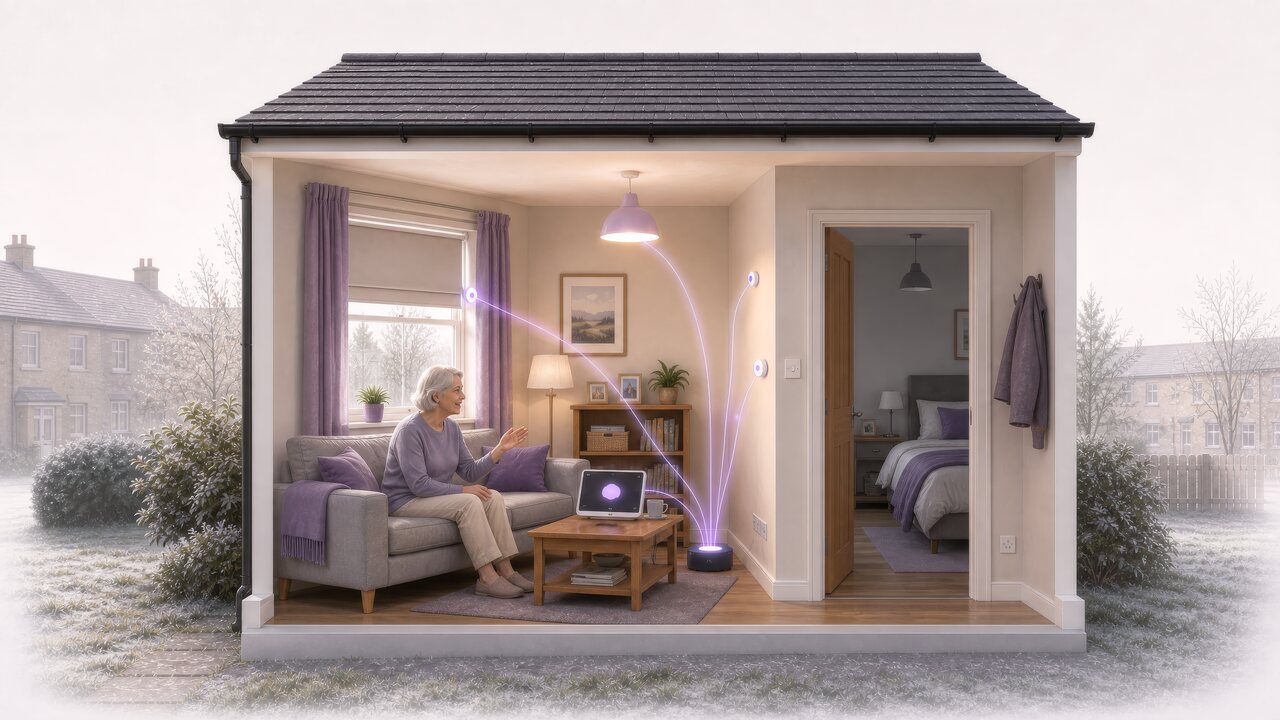
Resident using a voice-enabled display to control connected lighting and a window blind through the home SmartHub.

Everyday control that can support greater independence

For some residents, operating a light, blind or other item of supported equipment can be inconvenient or physically difficult. Connecting equipment via SmartProperties can provide a more accessible way to interact with the home, using the SmartProperties interface and permissions agreed for the service.

The same connection can help the Service Provider understand which managed equipment is associated with the property and the tenant, including equipment status verification and if any operational attention is needed.

featuretypical content

Resident access

Make routine actions easier to reach

Compatible equipment can be connected to the SmartProperties interface so that common actions can be made more accessible. The precise control method—such as a physical control, voice-enabled interface or another supported interaction e.g. through APIs can be determined based on the service need.

featuretypical content

Property context

Keep each control connected to the right place

SmartProperties associates managed equipment with the correct property and, where relevant, the room in which it is installed. That context helps distinguish, for example, a bedroom light from equipment serving another part of the home.

featuretypical content

Service visibility

Give responsible teams clearer operational information

Connecting devices to the SmartProperties platform allows authorised staff to see relevant information on the state of that device, e.g. connectivity, battery levels, last used information. This supports remote management and informs preventative maintenance

A managed connection between the home and the service

In deployments using a SmartHub, it provides a managed connection between supported equipment in the property and the wider SmartProperties service.

It can bring together different in-home integration methods without requiring the resident to understand the protocol or supplier behind each device. Bluetooth Low Energy, Zigbee 3.0 and Matter are supported by the SmartProperties SmartHub

Connect supported equipment

The SmartHub provides the in-home foundation through which paired equipment can be associated with SmartProperties. The installer pairs the equipment to the SmartHub, that equipment can then be managed via SmartProperties

Maintain the link to SmartProperties

The SmartHub connects in-home equipment to the centrally managed property record in SmartProperties. SmartProperties manages access to those services responsible for its operation and monitoring.

Keep technical complexity behind the service

Residents interact with the controls made available to them. Device protocols, provider identifiers and integration details remain part of the managed technical service rather than becoming something the resident has to coordinate.
Equipment can change without losing the story of the home

Connected equipment has its own identity and lifecycle, but the property and room remain the stable context around which the service is organised.

SmartProperties separates its internal record from a manufacturer’s or provider’s identifier. This means that replacing a device does not have to erase the history of the room, property or service it supported.

featuredemanding content

Associate the equipment

A supported device is recorded against the correct property and, where required, the correct room. The association identifies where it belongs without confusing assignment with live connectivity.

featuredemanding content

Manage the Device

Relevant information from managed devices can include the device model, assignment, lifecycle state and the last time the device was contacted.

featuredemanding content

Replace or reassign it under control

When equipment is replaced, removed or reassigned, SmartProperties can preserve the required assignment and audit history while creating a clear record for the new device. This ensures that the underlying metadata is never lost.

featuredemanding content

Retain the property context

Observations, service history and room context remain associated with the property rather than becoming dependent on one physical device. Retention and deletion continue to follow the organisation’s agreed policy.

Simple for residents. Clear for the people supporting the home.

Residents get straightforward ways to control supported equipment. Service teams get the information and tools they need to look after it.

SmartProperties keeps these experiences separate. Residents use the controls set up for their home, while staff only see or manage the equipment relevant to their work.

Controls that suit the resident

Controls can be set up around the resident’s needs and the equipment in their home. Depending on the service, this could include voice-enabled displays, touch controls, physical switches or other accessible options.

A clearer view of connected equipment

The right staff can see which equipment is installed, where it is located and whether it may need attention. What each person can see or change depends on their role.

A service that works the way you do

Each organisation chooses the equipment, resident controls, staff access and service connections it needs. SmartProperties brings these choices together in one consistent service.

A connected home that can change with the resident

Needs change. Equipment is replaced. New technology becomes available. SmartProperties helps the connected home develop without losing the history and context already built around the property.

New equipment can be added when it has been shown to work with the service. Because SmartProperties keeps the property and room at the centre, changing a device does not mean starting the property record again.

The aim is to support a growing choice of equipment and suppliers over time. Every device still needs to be checked for compatibility before it becomes part of the service.

The right controls for each home

The controls available in a home depend on the resident’s needs, the equipment being used and what has been tested and approved for the service.

featuredemanding content

Consistent foundation

The property stays at the centre

SmartProperties keeps a consistent record of the property, its rooms and its connected equipment. This provides continuity when devices are added or replaced.

featuredemanding content

Chosen for the service

Equipment and controls that meet the need

Each organisation chooses the equipment and resident controls that suit the service it wants to provide. Staff access and connections to other systems are set up at the same time.

featuredemanding content

Checked for compatibility

Lights, blinds and other equipment

Compatible lights, blinds and other supported equipment can be included once the products and the way they connect have been tested and approved.

featuredemanding content

Added where supported

Automation and remote support

Features such as automatic routines, remote control and recovery after a connection problem can be added where the equipment and service support them. Their availability is confirmed as part of each deployment.

Explore a connected-home service built around the resident

Talk to scotsphere AI about the controls that could make a meaningful difference in the home, the equipment and integrations available to support them, and the governance your organisation needs.

We can help you explore a focused SmartProperties configuration that keeps the resident experience simple while preserving the property, device and service context behind it.